Unassign Numbers
The Unassign Numbers request enables you to unassign numbers that have been assigned to a user. Once unassigned, the number can be reassigned to another user. Assigned numbers must be unassigned before they can be released (see Release Operator Connect Numbers from Customer). Numbers are unassigned from customer users in their Teams admin center ('Phone Numbers' tab).
For OC Essentials + and OC Pro customers, ensure you have a secure connection for synchronization between Live Platform and the tenant M365/Microsoft Teams platform.
URI
{{baseUrl}}/api/v2/oc/numbers/action/unassign?msTenantId={{msTenantId}}HTTP Method
POST
Request Parameters
|
Parameter |
Type |
Mandatory |
Description |
|---|---|---|---|
|
msTenantId |
string |
Ö |
Microsoft subscription Customer Tenant Id. |
Request Body
The Request Body includes the phone number that you wish to unassign. Phone number validation rules are in accordance with E.164 format:
| ■ | A + sign. |
| ■ | Country calling code (international). |
| ■ | Local area code. |
Local telephone number or subscriber number.
It has the following structure: [+][country code][area code][subscriber number].
Example of a number with E.164 format in the United States:
Telephone number: 415 123 1234
E.164 format number: +14151231234
| ■ | Country code: +1 |
| ■ | Area code: 415 |
Phone number ranges should be configured as follows:
Example Request
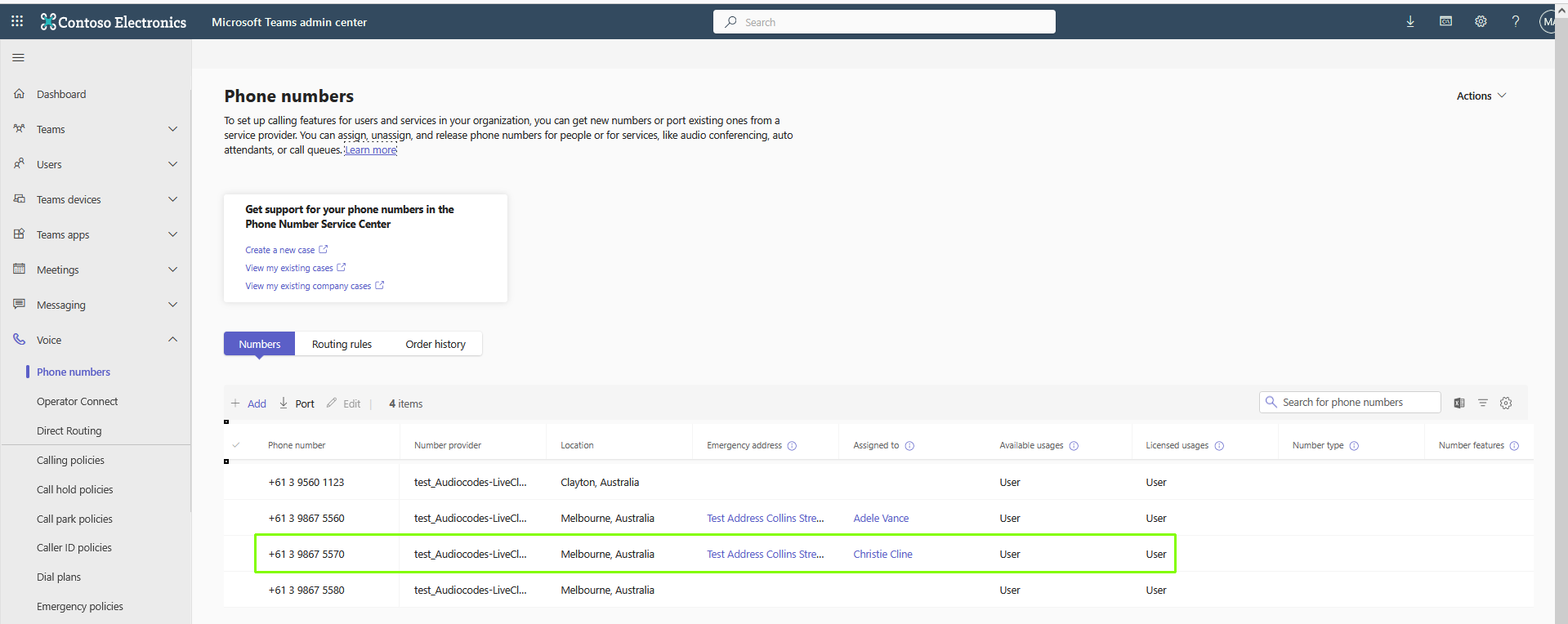
Request to unassign the highlighted number from the customer tenant user.
Single Numbers
{
"telephoneNumbers": [
 "+61398675570, +61398675571"
]
}
Number Range
{
 "NumberRangeStart": "+61398674000",
 "NumberRangeEnd": "+613986740010"
}
Example Response
The initial response displays the Task Id.
|
Parameter |
Type |
Description |
|---|---|---|
|
taskId |
string |
The queued task Id that is generated for this action. You must run the Task request to retrieve the status of the action. See Task Status. Note that the tsk_ms_job string in the prefix is unique for this endpoint. |
{
    "taskId": "un_c565c145-61ac-49f6-907f-fe479e638516__4abf2ac9-e462-4256-bbb3-b8182fd5c94c"
}
The execution of the request may take a few minutes. The status will progress from 'In Progress' to 'Completed Success'.
{
    "id": "c565c145-61ac-49f6-907f-fe479e638516",
    "status": "Success",
    "executionMessages": [],
    "outputData": {
        "telephoneNumbers": [
            {
                "telephoneNumber": "+61396734007",
                "status": "Success",
                "errorCode": 0,
                "errorMessage": null
            },
            {
                "telephoneNumber": "+61396734008",
                "status": "Success",
                "errorCode": 0,
                "errorMessage": null
            }
        ]
    },
    "createTime": "2026-08-16T15:12:49.7925816+00:00"
}
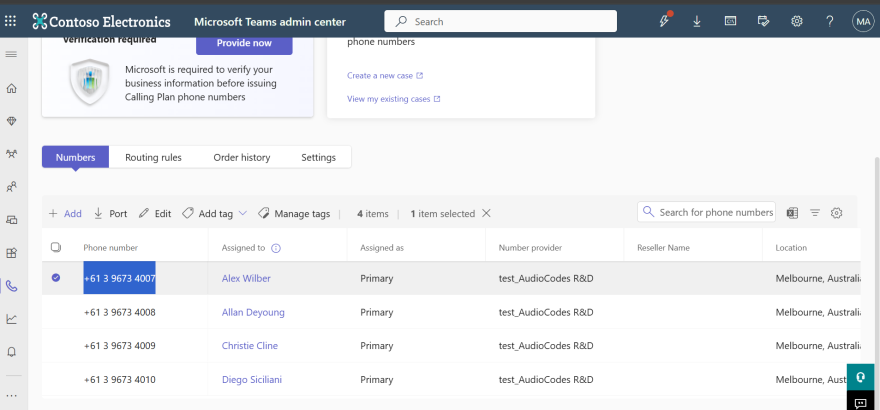
The following screen shows the customer Teams admin center before the numbers shown in the Request Body above are unassigned.
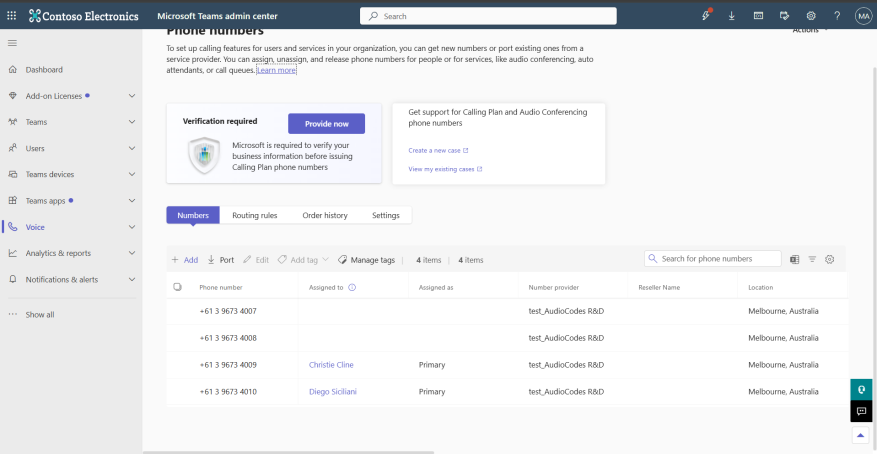
The following screen shows the customer Teams admin center after the numbers have been unassigned.
HTTP Responses
| ■ | 200 OK |
|
Parameter |
Type |
Description |
||||||||||||
|---|---|---|---|---|---|---|---|---|---|---|---|---|---|---|
|
totalNumbersCount |
integer |
Total number of numbers unassigned. |
||||||||||||
|
id |
string |
The task Id that is generated for this action. See Task Status. |
||||||||||||
|
status |
string |
Aggregated status reflecting update status on both the Live Platform and Operator Connect:
|
||||||||||||
|
executionMessages |
null |
Internal debugging messages. | ||||||||||||
|
outputData |
dictionary |
List array including the following parameters:
|
||||||||||||
|
telephoneNumber |
string |
Telephone numbers that have been unassigned. |
||||||||||||
|
status |
string |
Indicates the status of the request:
|
||||||||||||
|
errorCode |
integer |
- |
||||||||||||
|
errorMessage |
string |
Additional information. |
| ■ | 400 Bad Request |
|
Parameter |
Type |
Description/Examples |
|---|---|---|
|
errors |
string |
Text description of the error. |
|
type |
string |
"https://tools.ietf.org/html/rfc7231#section-6.5.1" |
|
title |
string |
Email title. For example "One or more validation errors occurred." |
|
status |
error code |
HTML error code i.e. 400 |
|
detail |
string |
Additional error details. |
|
traceId |
string |
Error trace Id |
|
instance |
string |
Error instance |
|
errorTicket |
string |
This field may not appear for all return codes. |
|
errorCode |
string |
This field may not appear for all return codes. |
|
additionalProp1 |
string |
Custom Script variable argument. For example "CacProfile": "5 sessions" |
|
additionalProp2 |
string |
Custom Script argument. For example, ProxySet": "SIPTrunk" |
|
additionalProp3 |
string |
Custom Script argument. For example, "OnlinePstnGateway": "sandbox1.audiocodes.be" |
| ■ | 403 Forbidden |
|
Parameter |
Type |
Description/Examples |
|---|---|---|
|
errors |
string |
Text description of the error. |
|
type |
string |
"https://tools.ietf.org/html/rfc7231#section-6.5.1" |
|
title |
string |
Email title. For example "One or more validation errors occurred." |
|
status |
error code |
HTML error code i.e. 400 |
|
detail |
string |
Additional error details. |
|
traceId |
string |
Error trace Id |
|
instance |
string |
Error instance |
|
errorTicket |
string |
This field may not appear for all return codes. |
|
errorCode |
string |
This field may not appear for all return codes. |
|
additionalProp1 |
string |
Custom Script variable argument. For example "CacProfile": "5 sessions" |
|
additionalProp2 |
string |
Custom Script argument. For example, ProxySet": "SIPTrunk" |
|
additionalProp3 |
string |
Custom Script argument. For example, "OnlinePstnGateway": "sandbox1.audiocodes.be" |
| ■ | 413 Content Too Large |
|
Parameter |
Type |
Description/Examples |
|---|---|---|
|
errors |
string |
Text description of the error. |
|
type |
string |
"https://tools.ietf.org/html/rfc7231#section-6.5.1" |
|
title |
string |
Email title. For example "One or more validation errors occurred." |
|
status |
error code |
HTML error code i.e. 400 |
|
detail |
string |
Additional error details. |
|
traceId |
string |
Error trace Id |
|
instance |
string |
Error instance |
|
errorTicket |
string |
This field may not appear for all return codes. |
|
errorCode |
string |
This field may not appear for all return codes. |
|
additionalProp1 |
string |
Custom Script variable argument. For example "CacProfile": "5 sessions" |
|
additionalProp2 |
string |
Custom Script argument. For example, ProxySet": "SIPTrunk" |
|
additionalProp3 |
string |
Custom Script argument. For example, "OnlinePstnGateway": "sandbox1.audiocodes.be" |